
For years the advice for keeping a character consistent was “write a longer prompt.” Pile on the adjectives, nail down the eye color, describe the exact shade of the coat, and the model would supposedly hand you the same person every time. It never quite worked, and in 2026 it is no longer the plan at all. The consensus across the leading tools has flipped: identity lives in the reference image, not the words. You describe the scene, and you let a picture carry the face.
That single shift is the thing most people are still catching up to. If you are on shot forty and your character is drifting, the reflex is to add more words. The modern fix is almost the opposite: say less about the person, hand the model a clean picture of them, and spend your words on what actually changes from shot to shot. This post is about drawing that line precisely. What text is genuinely good at, what only a reference can do, why the best modern setup uses both plus a third layer, and how the whole thing holds up when you are not making three shots but three hundred. We covered the full ladder of methods in an earlier post. This one zooms into the rung everyone lives on and gets the division of labor right.
Why the face wanders in the first place
The failure has a name worth knowing, because naming it tells you how to fight it. It is identity drift, and it is not random noise. The model does not treat your character like an actor who returns to set remembering exactly how they looked yesterday. Every generation is an independent request, and the model re-samples a face from a huge distribution of plausible faces that match your description. Nothing carries over unless you carry it over.
That is why the drift compounds instead of averaging out. If shot three has a slightly narrower nose, and you use nothing but words on shot four, the model has no idea shot three ever happened. It samples again from scratch. Small deviations stack: a face that is five percent off on shot three can be recognizably a different person by shot twelve. Creators describe it the same way every time. The hair color shifts, the features “average out,” the beard gets fuller, and the character becomes a stranger halfway through. The practical lesson is blunt: text alone gives the model permission to re-imagine the face on every single shot, and over a long run it will take that permission. The reference image is how you take it away.
What text is for, what the reference is for
Once you accept that the reference carries identity, the two tools stop competing and start dividing the work. Each one is good at a different job, and the drift you see in long projects is almost always one of them being asked to do the other’s.
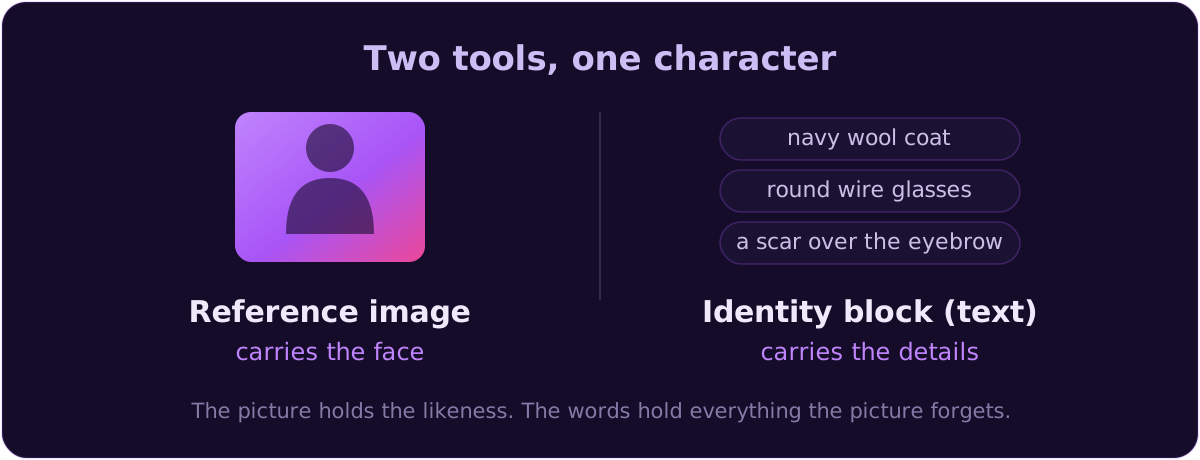
Text is unreliable at faces and excellent at everything a face is wearing or holding. Models latch onto specific tokens, so a fixed phrase like “navy wool coat, round wire glasses, a thin scar over the left eyebrow” repeated identically across forty shots holds those details far better than forty slightly reworded versions. What text cannot do is pin a specific likeness. Two people can match “a 40-year-old man, short grey beard, close-cropped dark hair” perfectly and still look nothing alike. Text describes a category of person. It cannot name the exact one.
The reference image does the opposite. It carries the actual likeness, the thing words cannot encode, straight into a new scene, pose, and setting. So the split is clean and worth memorizing: the reference carries the face, the words carry the wardrobe, the props, and the small signature details every model quietly forgets. The words become an identity block, a fixed checklist you paste verbatim every time, not a mood paragraph and not a full physical description trying to do the reference’s job. You are not describing the person anymore. You are reminding the model about the coat.
How many references, and how the tools take them
The practical sweet spot is three reference images at different angles: one front-facing, one three-quarter, and one full-body shot that shows the outfit. A single clean reference already gets you a long way; adding the second and third angle buys you maybe five to ten percent more consistency by giving the model more information to rebuild the same person in a new pose. It is not strictly required, but on a long project it is cheap insurance. Build these once as a character sheet before you generate a single story shot, and every method downstream works from the same canonical version of your character instead of a slightly different face you happened to like that day.
How you feed those references depends entirely on the tool, and the differences are real gotchas:
- Midjourney V7 uses Omni Reference, which takes exactly one image. You pass it as
--orefwith an image URL, and control its strength with--ow(Omni Weight), a dial from 1 to 1000 that defaults to 100. Keep it under about 400, since higher gets unpredictable unless stylize is very high, and drop it low (around 25) when you deliberately want to change the art style, say photo to anime. Note the trap: the old--crefCharacter Reference, which could take multiple URLs, is incompatible with V7. If an older tutorial tells you to use--cref, it is out of date. - Google’s Nano Banana Pro, built on Gemini 3 Pro Image, is at the other extreme. It blends up to fourteen input images in a single generation while maintaining the resemblance of up to five people and the fidelity of up to fourteen objects. That is one of the highest published multi-reference capacities among mainstream tools, and it is what lets you drop the same cast into fresh scenes with new outfits or build a storyboard without the faces changing.
- In the products you actually reach it through, the reference is often addressed inline. Magnific (Freepik) surfaces Nano Banana Pro’s fourteen-image limit directly, and the working pattern is a prompt like “Using @img1, place this character in a rainy Tokyo street, wearing the same outfit, cinematic lighting, low angle.” The character reference is
@img1; the words describe only what changed.
The Magnific (Freepik) guidance is worth stealing wholesale: start with two to four references, not ten, and give each image one job. This one is the subject, this one is the character, this one is the environment, this one is the pose. Piling on ten redundant angles does not help as much as three clean images that each carry a distinct piece of information.
The layered stack that beats any single method
Here is the part that separates a 2026 workflow from a 2024 one. The strongest setups do not pick text or reference or training. They stack all three, because each covers a weakness of the others.
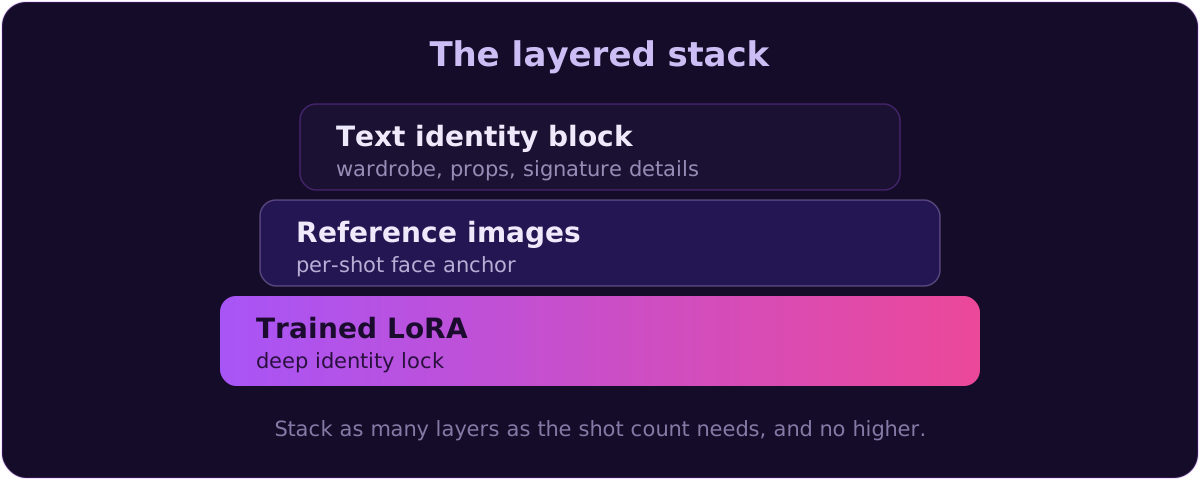
The deepest identity layer is still a trained character model, a LoRA. It remains the strongest single lock for a recurring character, and it is more approachable than its reputation suggests: you can train one on as few as ten good images, and fifteen to twenty sharp, varied shots, different pose, lighting, and background so the model learns the person and not the backdrop, will beat seventy-five inconsistent ones. Typical settings land around 1500 to 2500 training steps, a learning rate near 1e-4, resolution matched to the base model, a unique trigger word, and minimal captions like “ohwx woman, smiling, outdoor.” If it overfits, drop the LoRA strength to 0.5 to 0.6 at inference or add a few hundred regularization images. Dataset quality matters more than any single hyperparameter.
The frontier, though, is combining that LoRA with reference images at generation time. FLUX 2 Pro accepts up to eight reference images at inference, and the reported benchmark is striking: a FLUX 2 LoRA at 0.6 weight combined with four reference images outperformed a FLUX 1 LoRA run at full weight with no references at all. Even a mediocre LoRA plus reference guidance produces excellent results. So the best modern stack is three layers working together: a LoRA for the deep identity, reference images for per-shot anchoring, and the text identity block for the wardrobe and details. You climb to as many layers as the shot count justifies, and no higher.
One nuance that trips people up: seeds are not on this stack the way old tutorials imply. Same seed plus same prompt plus same settings does reproduce the same image, and holding a seed while you nudge a single variable like expression can help. But it is a myth that a locked seed holds a character once the prompt changes meaningfully. Change the pose or composition and the seed’s grip drops off; the face snaps to a nearby but different identity. Seeds behave differently across tools and versions and can shift in remix modes. Worse, some newer models, Nano Banana Pro among them, do not expose a seed parameter at all, so “just lock the seed” is outdated advice for exactly the tools people are reaching for now. Lean on reference strength and the verbatim identity block instead.
Holding it across a few hundred shots
Everything above holds one character across a handful of shots. Scaling it to a few hundred is a different discipline, and it is where most tutorials go quiet. Three habits do the heavy lifting.
First, re-anchor to a canonical hero reference, never to your last output. The tempting shortcut on a long run is to grab the previous generated frame and use it as the reference for the next one. That is exactly how drift compounds: you are chaining off an image that is already slightly off, so each shot inherits and amplifies the last one’s error. Instead, keep one canonical reference set, your character sheet, and point every shot back at it. Errors stop stacking because nothing downstream ever becomes the source of truth.
Second, batch by character, not by scene. Your instinct is to work in story order, but for the generation pass do the opposite: group all of one character’s shots together, load their reference set once, and run the whole batch before you touch the next character. The reference stays loaded and identical across that character’s entire set, which is both more consistent and far faster than reloading references shot by shot, and it neatly sidesteps the blending problem we will hit in a moment. You generate by character and reassemble by scene later. This is the routing workflow in full, and it is the piece almost no consistency guide covers.
Third, plan for a hit rate, not perfection. Even a perfectly locked setup shows visible drift on roughly ten to twenty percent of generations. So batch-generate five to ten candidates per shot and cherry-pick the keeper. And catch drift early: because the error compounds, a face that is slightly off on shot three is a real problem by shot twelve, so review your first handful of each character’s shots before you commit the whole batch, not after.
Two characters in one frame
The moment a second character enters the shot, consistency gets genuinely harder, and this is the honest frontier where no tool fully nails it yet. Models blend features across the two people: character A’s nose lands on character B, the hair colors average, the outfits swap. It is the single most common wall people hit.
There is a recipe that helps, and it is an order of operations. Define each character separately, with their own reference and their own identity block. Then set explicit positions, who is on the left, who is on the right, who is foreground. Only then add the interaction or action. Define, position, action, in that order. Collapsing all three into one sentence (“two people arguing in a kitchen”) is what invites the blending, because the model has no anchor for which face goes where. Nano Banana Pro’s ability to hold up to five people in one generation is the current high-water mark for this, but even there you will iterate.
For a scene that refuses to cooperate, fall back on the compositing move: generate each character separately in their own pass, keeping each one’s identity tight, and combine them in the edit rather than trusting a single multi-character generation. And notice that batching by character from the last section already pushes you toward this, because you were never generating two identities in the same pass to begin with.
When it still drifts: the fix checklist
Even a good stack drifts sometimes. The mistake is re-rolling the whole shot when the composition was fine and only the face slipped. Diagnose the symptom, then apply the smallest fix.
- The scene is perfect but the face drifted. Do not re-roll. Mask just the face and inpaint it, regenerating only the drifted region against your reference. This is an underused technique that saves the ninety percent of the frame that was already right.
- A stubborn keyframe will not hold the likeness. Run a face swap onto that single frame from a clean reference, then blend it in post. Cheaper and more reliable than gambling on another full generation.
- The pose is locked rigid, or the face keeps sliding. Adjust reference strength. Too strong and the reference locks the pose so the character cannot move; too weak and the face drifts. On Midjourney that is
--ow; on other tools it is the character-weight or reference-strength dial. Nudge it, do not abandon the reference. - The wardrobe or a prop keeps changing. That is a text problem, not a reference problem. Tighten the identity block and make sure you are pasting it verbatim, not paraphrasing “emerald eyes” into “green eyes” without noticing.
The honest state of it, and the method for your project
The tools have moved fast and it is worth naming where they stand. On the image side, Nano Banana Pro leads the hard consistency tests, with Flux and Midjourney trailing on identity over long sequences. Nano Banana Pro’s fourteen references and five-person capacity make it the strongest multi-reference option for the money right now. Set your expectations in numbers: reference plus a locked identity block realistically gets you to about eighty-five to ninety percent consistency. Midjourney’s Omni Reference is cited above ninety percent, but on a spectrum from “very consistent” to “recognizably the same person,” not pixel-identical, and Midjourney says so plainly. A LoRA raises the ceiling further. None of it hits a hundred percent every frame, which is why generate-and-pick and post fixes are part of the craft, not a sign you did it wrong. On video, the same reference-first logic carries over, and we go deeper on it in keeping a character consistent in video: Kling 3.0’s Elements can even take a video reference and its multi-shot storyboard defines three to twelve shots while auto-maintaining continuity, Runway Gen-4 is the pro pick for reference-driven consistency and camera control, and Veo 3.1 leads on scene consistency. Perfect identity across fifteen scenes is still not a button you press; reference-image control is the best lever available.
So match the method to the scale, and no higher. A handful of shots in one scene: one clean reference plus the identity block, done. A short video, dozens of shots, one or two characters: three references kept tight with the block, batched by character, five to ten candidates per shot. Hundreds of shots, a recurring host, or a series you will revisit for months: train a LoRA per main character and combine it with references at inference, the full layered stack. The failure is almost never the abstractly wrong method. It is using bare text for a job that needed a reference, or leaning on a seed for a job that needed a hero image you re-anchor to every time.
BatchFrames keeps the words locked and the references grouped
References carry the face, but the identity block, the exact same words on every shot, is what stops the wardrobe and the props from drifting, and hand-typing it three hundred times is where it slips. BatchFrames turns your script into structured prompts, keeps each character's identity block worded identically across every shot with @mention tags, and exports the set grouped by character so your references and trained models flow straight into your image and video tools, one identity at a time.
Where to go from here
The whole thing collapses to one reframe: stop describing your character and start showing them. In 2026 the reference image carries the face, the identity block carries the wardrobe and the details, and a trained LoRA carries the deep identity when the shot count justifies it. Stack the layers your project actually needs, re-anchor to a canonical reference so drift never compounds, batch by character, and plan for a hit rate instead of a perfect frame. Do that and one character walks through a few hundred shots as themselves, without you writing their description a few hundred times.
In the next post we will turn from one character to the world around them: keeping the setting, the lighting, and the color grade consistent across a whole video, so your shots feel like one film even when the character finally leaves the frame.