
The most boring habit in AI image generation, repeating the exact same words on every shot, is also the one that keeps a character looking like themselves. It is where everyone should start, and we broke down the full four-part structure in the anatomy of a great prompt. But anyone who has actually generated a long script knows exact wording is the floor, not the ceiling. Somewhere around shot forty, a face you locked with words starts to wander. The jaw softens, the hair lightens, the navy coat drifts a shade closer to black, and by shot eighty you are watching a slow motion identity swap that nobody approved.
So the real question for long-form work is not “what is the one trick.” There is no single switch. There is a ladder of methods, each one more powerful and more work than the last, and the skill is picking the lowest rung that will actually hold for the number of shots you have to ship. Use raw text for a six-shot intro and you are fine. Use it for a two-hundred-shot documentary and you are going to spend your weekend fixing faces. Here is the whole ladder, what each rung buys you, and where it quietly falls apart.
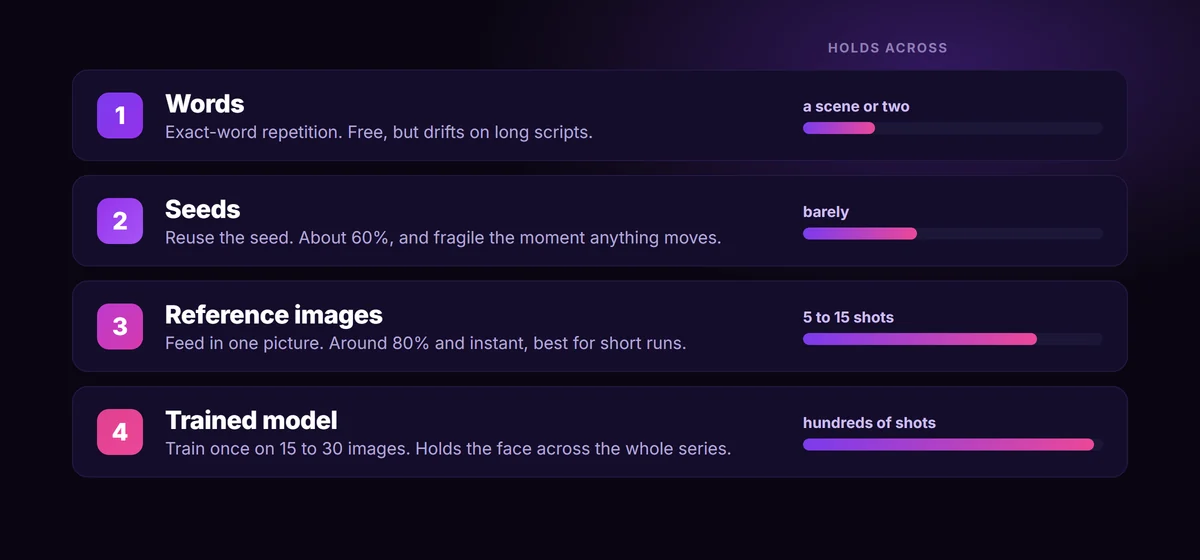
Start here, always, because every other rung sits on top of it. Write one locked description of your character, a small character bible, and reuse it word for word on every prompt. Not a vibe. A fixed block: “a 40-year-old man, short grey beard, close-cropped dark hair, navy wool coat, round wire glasses.” Models latch onto specific tokens, so “navy wool coat” repeated identically across forty shots holds far better than forty slightly reworded blue jackets.
Two rules do most of the work here:
- Lock the words once and stop paraphrasing yourself. The drift you see in long projects is usually not the model failing, it is you describing the same coat five different ways without noticing.
- Be concrete about the things models forget first. Eye color, the exact hair length, a scar, a specific prop. The model will happily reinvent anything you leave vague.
Text alone is enough to anchor wardrobe, build, and broad style across a surprising number of shots. What it cannot do reliably is hold a specific face. Two people can match your description perfectly and still look like strangers. That is the wall text hits, and it is why the next rungs exist.
A seed is the random starting point a model uses to build an image. Reuse the same seed with the same prompt and you will get close to the same picture, which feels like a consistency cheat code the first time you try it. In practice it lands around sixty percent reliable, and it is brittle in a specific way: the moment you change the pose, the lighting, or the composition, the new instructions tend to override the seed and the face shifts anyway.
So treat seeds as a supporting tool, never the strategy. They are genuinely useful for one job: locking a base look while you iterate a single variable. Found a face you like and just want to nudge the lighting? Hold the seed. But the second your script asks the same character to turn, walk, sit, and react across different scenes, the seed stops carrying them. Leaning on it for a whole video is how you end up with a character who is consistent only as long as nothing happens to them.
This is the rung most people should climb to, and the one that feels like magic the first time. Instead of describing the face, you hand the model an actual picture of your character and tell it to carry that identity into a new scene. Under the hood this is reference conditioning (the open-source name is IP-Adapter); in the products you use it shows up as “character reference,” Midjourney’s Omni Reference, or simply dropping an image into Nano Banana or a Flux model. No training, no waiting. You get roughly eighty percent consistency instantly.
It is the right tool for short runs, a single scene, a five to fifteen shot sequence. The catch is the same one that haunts every cheap method: it drifts as the run gets longer. In hard tests, Midjourney’s Omni Reference starts wandering around the third scene and becomes a similar-looking but clearly different person by the fifth. So a few habits matter:
- Use a clean reference. Front-lit, high resolution, neutral background, the character looking roughly at the camera. A messy or dim reference gives the model permission to improvise.
- Keep the character bible running alongside it. Reference for the face, words for the wardrobe and props. Belt and suspenders drift far slower than either alone.
- Mind your model. As of 2026, Google’s Nano Banana and GPT-4o lead the hard consistency tests, with Flux Kontext and Midjourney trailing on identity over long sequences. For character-consistent work at lower cost, Nano Banana has the edge. Pick the tool that is actually good at this, not just the one you already pay for.
When you are looking at hundreds of shots, a recurring host, or a series you will come back to for months, the robust answer is to stop borrowing a face and start owning one. You train a small character model, a LoRA (most production work moved off the older DreamBooth approach by now), on your specific character. Feed it fifteen to thirty curated images of that person from different angles, expressions, and lighting, on clean backgrounds, and the training bakes the identity into a tiny adapter.
Once it exists, you can drop that character into any scene, pose, or style you can prompt, and the face and build hold. The cost is real and entirely upfront: gathering and cleaning the image set, then running the training. But amortized across a few hundred shots, or a host who appears in every video you make for a year, it is the cheapest method per usable frame by a wide margin.
The professional setup stacks the rungs. In a node tool like ComfyUI, the most reliable result comes from combining a face adapter (IP-Adapter FaceID) for identity, a character LoRA for body and style, and ControlNet for pose. Each one covers a weakness of the others. You do not need that rig for a short video, but it is worth knowing the ceiling exists when a project demands it.
Build the character sheet first
Here is the single highest-leverage hour in any character-driven project, and almost nobody spends it up front. Before you generate a single story shot, build a character sheet: your character rendered from several angles (front, three-quarter, profile), a neutral expression plus one or two others, consistent wardrobe, clean background. Lock the best of each.
That sheet does double duty. It is your reference pack for the workhorse rung, and it is your training data if you climb to a LoRA. Doing it once at the top of the project means every method below it is working from the same canonical version of your character instead of a slightly different face you happened to like that day. Skip it and you are quietly re-deciding what your character looks like on every shot, which is exactly the drift you are trying to avoid.
Plan for drift, because it will happen
No method on this ladder gets you to a hundred percent on every frame, and chasing that number is a trap. Two production habits handle the reality instead.
First, generate two or three versions of each shot and pick the best. It is cheap insurance, and it is what experienced creators quietly do on every clip. The occasional off frame stops mattering when you always have a backup.
Second, fix faces in post instead of re-rolling whole shots. When the scene, lighting, and body are perfect but the face drifted, run a face-swap or image-edit model on that one key frame rather than burning another generation on the entire composition. Then lock the quality of your keepers with an upscaler like Magnific (Freepik) so the detail holds when it hits the timeline. The goal is not a character who is identical under a microscope. It is a character who holds across the cut, at the speed a viewer actually watches.
Pick the lowest rung that holds
The whole point of a ladder is that you do not climb higher than you have to. Match the method to the shot count:
- A handful of shots, one scene. Words plus a single reference image. Anything more is wasted setup.
- A short video, dozens of shots, one or two characters. Reference images kept tight with the character bible, two or three rolls per shot. This covers most faceless-channel work.
- A long series, a recurring host, or hundreds of shots. Train a LoRA per main character, and keep references on hand for one-off background faces.
The mistake is almost never picking the “wrong” method in the abstract. It is using raw text for a job that needed a reference, or training a model for a job that needed three locked words. Start at the bottom, climb only as far as your shot count forces you, and stop.
BatchFrames does the unglamorous part for you
Every rung on this ladder still depends on the same boring foundation: the exact same words, on every single shot. BatchFrames turns your script into structured prompts, keeps each character worded identically across all of them with @mention tags, and exports the set grouped by character so your references or trained models flow straight into your image and video tools.
Where to go from here
Character consistency is not one trick, it is a ladder: locked words at the bottom, then seeds, then reference images, then a trained model at the top. Each rung trades more setup for more stability, and the right choice is entirely a function of how many shots you have to keep that face alive across.
Build the character sheet first, keep the text bible running no matter how high you climb, and plan for the occasional fix instead of chasing a perfect frame. Do that and a character will hold across a hundred shots without you re-describing them a hundred times.
In the next post we will pick up where this one ends: getting a locked character to move. Keeping identity steady is one problem, keeping it steady once the image starts animating is another, and the workflow for it is worth its own walkthrough.