
Here is the number that gets everyone excited: you can generate a gorgeous five second video clip for roughly the price of a stick of gum. Then you try to make something real, a ten minute piece with three hundred shots, and the bill is suddenly a number you have to think about. Nobody set out to spend that. It crept up, one cheap clip at a time.
The per-clip price is the most misleading figure in AI video. It is real, it is genuinely low, and it quietly hides the two things that actually drive your cost: how many times you generate each shot, and how many paid stages each shot passes through. Get those two right and a long video stays affordable. Get them wrong and you are funding a render farm to make a short film. Here is where the money really goes, and the four habits that keep it in check.
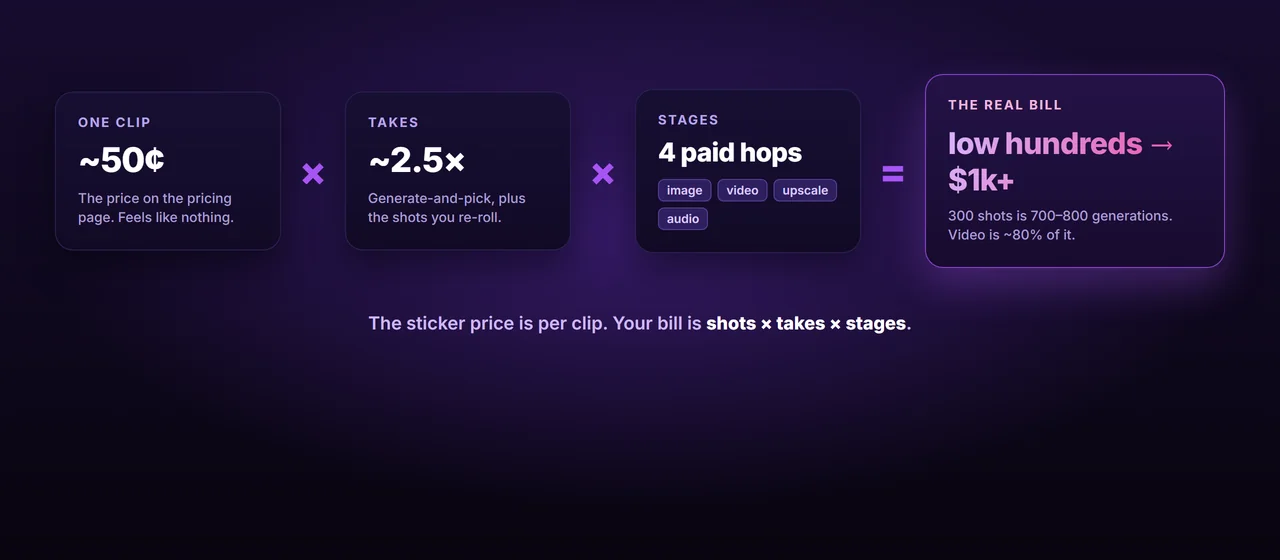
This is the multiplier that wrecks every naive budget. You do not generate three hundred clips for a three-hundred-shot video. You generate two or three takes of each shot and pick the best one, because that is the only way to get consistent quality, exactly as we covered in finishing a character in the edit. On top of that, even a mature pipeline rejects and re-rolls roughly one shot in fifteen, the number from the routing post.
So your real generation count is not three hundred. With an average of two and a half takes a shot, it is closer to seven or eight hundred. That is the figure to budget against. When you read “two cents a clip,” mentally multiply by three before you let yourself feel relaxed, because you are paying for every take, not just the keeper. The good news is that takes are also where discipline pays off fastest: every shot you nail in one or two tries instead of five is money straight back in your pocket.
Every tool sells you one of two things, and they fail in opposite ways. Subscriptions give you a monthly bucket of credits: Kling runs about seven to one hundred and twenty-eight dollars a month, Runway twelve to seventy-six, Midjourney ten to one hundred and twenty. They feel cheap right up until you hit the ceiling, and the ceiling is lower than you think. Runway’s twelve dollar Standard plan, as of mid-2026, buys only about twenty-five seconds of its top Gen-4.5 video for the whole month. Burn that on day two and you are rationing or waiting for the reset.
Pay-as-you-go credits and APIs work the other way. Veo bills roughly fifteen cents a second on its Fast tier and forty cents on Standard, so an eight second clip lands around three dollars. Runway’s API sells credits at about a penny each. There is no ceiling, which is the point, and also the danger: the meter just runs. The rule is simple. Steady, small runs are cheaper on a subscription. Big bursts, or anything where you would blow past a monthly bucket in a week, are cheaper and saner on metered credits. Match the model to your volume before you commit a project to it.
Most of what you generate is throwaway. Drafts, rejected takes, framing tests, the two versions of a shot you will never use. Paying top-tier rates for all of it is the single most common way creators overspend, because the expensive settings are right there and easy to leave on.
So iterate cheap, then finish expensive. Generate your drafts at lower resolution, with no audio, on the Lite or Fast tiers, where a clip can cost a few cents instead of a few dollars: Veo’s Lite tier is three to five cents a second against forty for Standard, and a draft image from Flux Schnell is about a penny. Approve the shot first. Only then do you spend on the keeper: the full-resolution render, the native audio pass, and the upscale to lock in detail, which on Magnific (Freepik) runs around eight cents for a 2K pass and sixteen for 4K. You are going to throw away more than half of everything you make. Do not let any of that half touch a premium rate.
There is a third pricing model that does not show up on the marketing pages: running the open models yourself. A cloud GPU rents for a flat hourly rate, billed by the second. As of mid-2026, an RTX 4090 on a service like RunPod is roughly thirty-five to seventy cents an hour, an A100 about a dollar forty. Your own card costs nothing but electricity once you own it.
That flips the whole equation. Instead of paying per generation, you pay per hour and generate as much as that hour allows. For the image stage especially, where open models like Flux are excellent and a batched workflow can push out hundreds of stills an hour, the local floor is dramatically below per-image credits at volume. The crossover is real: below a few hundred generations a hosted API is simpler and cheaper, but a large project that would cost you fifty dollars in image credits might cost three dollars of GPU time. Video is harder to run locally and the hosted services still lead on quality, so most people land on a hybrid: local for the cheap, high-volume image stage, hosted for the video keepers.
A three-hundred-shot video, costed out
Let us put real numbers on it, with the loud caveat that prices move monthly and yours will differ. Take a ten minute video, three hundred shots, clips around five seconds.
The image stage is almost free. Three hundred shots at two and a half takes is about seven hundred and fifty stills. On cheap draft tiers, that is somewhere between ten and forty-five dollars, and close to nothing if you batch it on a rented GPU. People expect the images to hurt. They do not.
Video is the whole bill. You will animate roughly three hundred approved stills, plus second takes on the ones that drift, call it four hundred clips, around two thousand seconds of generated video. On metered pricing that is a few hundred dollars at Fast-tier rates and well past eight hundred if you run everything at premium quality with audio. Add a couple of hundred upscales at eight to sixteen cents each and you have your answer: a serious long-form AI video lands in the low hundreds of dollars done carefully, and blows past a thousand done carelessly. The gap between those two numbers is entirely the four habits above. Video generation is eighty percent or more of every long-form bill, so that is the only stage where being careful actually moves the total.
Where the cost quietly doubles
One last trap, and it is the cheapest one to avoid. The fastest way to pay twice for the same shot is to lose track of which take you approved. You re-roll a shot, forget you already had a keeper, and generate it again. You upscale a clip, lose it in a folder of three hundred, and upscale it a second time. Every one of those is a paid generation you did not need, and at scale they add up to a meaningful slice of the bill.
This is the same discipline that keeps your video consistent, pointed at your wallet instead. A stable shot ID and a board that records what is already approved is not just project hygiene, it is the thing that stops you from buying the same shot twice. The cheapest generation is the one you do not have to repeat.
BatchFrames keeps you from paying for chaos
Most overspending at scale is wasted generations: blind re-rolls, lost keepers, the same shot upscaled twice. BatchFrames turns your script into structured, consistent prompts, tags every shot with a stable ID, and tracks what is already approved, so you generate each shot the fewest times it takes and never pay twice for a clip you already had.
Where to go from here
The honest takeaway is that AI video is cheap per clip and not cheap per film, and the whole difference between those is discipline. Count your takes, not your shots. Put the right pricing model under each stage. Spend the premium rates only on the keepers. Know where your own GPU beats the meter. None of it is exotic, and all of it is the difference between a long video that costs a nice dinner and one that costs a flight.
It is the same lesson as the rest of this series wearing a different hat: consistency, quality, and now cost at scale are not features you buy, they are habits you keep. The tools will keep getting cheaper. The discipline is what stays worth its weight.